
On this page
How the standard layout is arranged
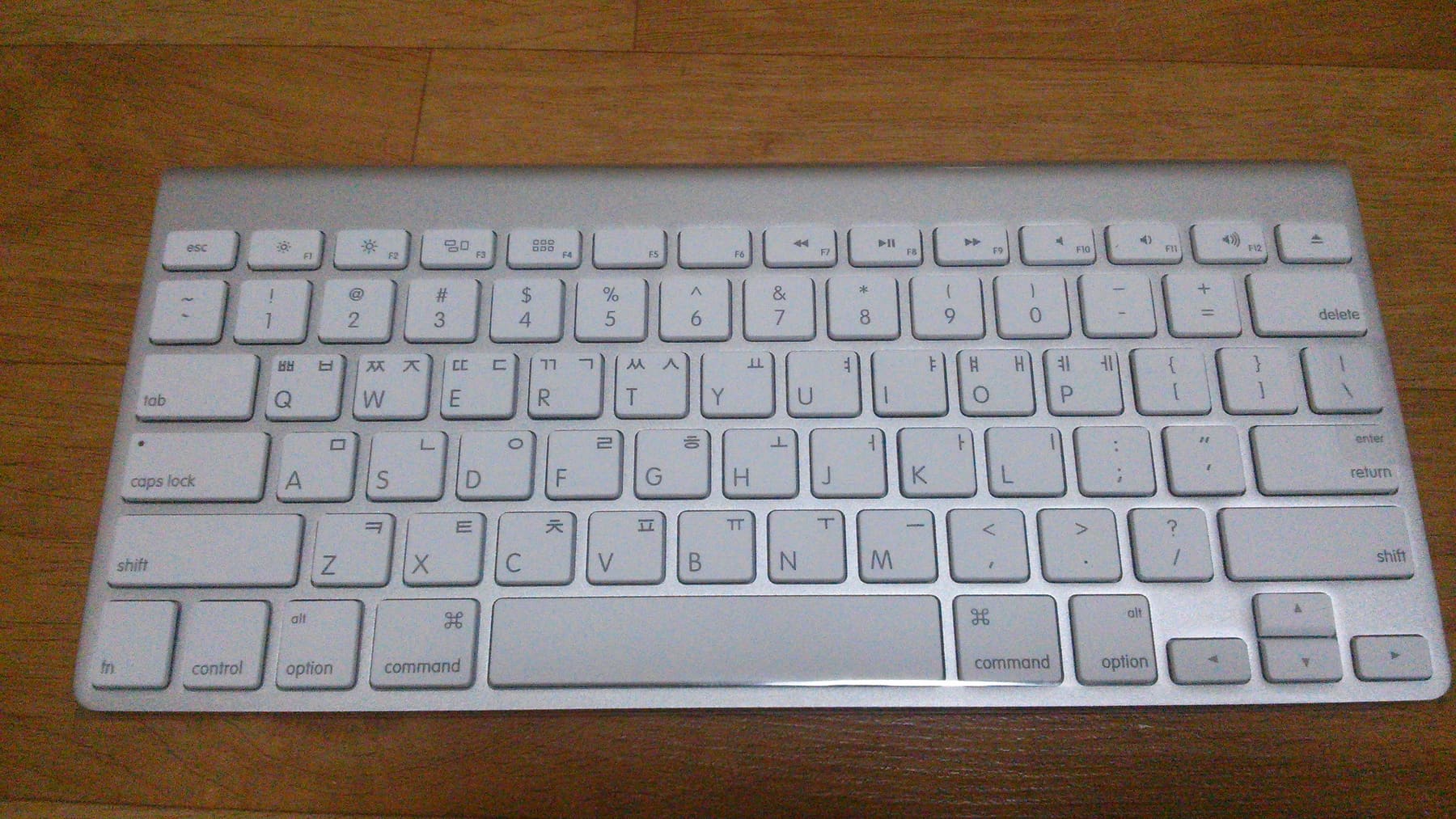
The standard Korean layout is called 두벌식 (2-set): one set of consonants on the left half of the keyboard and one set of vowels on the right. Because Korean syllables alternate consonant and vowel, your hands alternate too, which is what makes it fast once learned.
The key behavior is automatic composition: press ㅎ, then ㅏ, then ㄴ and they merge into the single syllable block 한. You type the letters in order and the system assembles the block. There is no separate step.
| To type | How | Example |
|---|---|---|
| Tense consonants (ㄲ, ㄸ, ㅃ, ㅆ, ㅉ) | Shift + the base consonant | Shift+ㄱ → ㄲ |
| Compound vowels (ㅘ, ㅝ, ㅢ) | Type the component vowels in order | ㅗ then ㅏ → ㅘ |
| Double final consonants (ㄳ, ㄵ, ㄺ) | Type both final consonants in sequence | ㅇ, ㅏ, ㄴ, ㅈ → 앉 |
| ㅐ vs ㅔ | Separate keys: ㅐ on the O key, ㅔ on the P key | They sound alike, so the spelling must be memorized |
Adding Korean on a computer
| Platform | Where to add it | Switching |
|---|---|---|
| Windows | Settings → Time & language → Language & region → Add a language → Korean | The 한/영 key (right Alt) or Windows+Space |
| macOS | System Settings → Keyboard → Input Sources → Korean (2-Set) | Caps Lock, or Control+Space |
| ChromeOS | Settings → Advanced → Languages and inputs → Input methods → Korean | Ctrl+Space |
On macOS the Caps Lock key doubles as the language switch, which surprises people at first. Holding it down still performs the original caps-lock function, so both behaviors remain available.
Adding Korean on a phone
- iPhone: Settings → General → Keyboard → Keyboards → Add New Keyboard → Korean. You then pick between the 2-Set QWERTY layout and the 10-key layout.
- Android (Gboard): Settings → System → Languages & input → On-screen keyboard → Gboard → Languages → add Korean.
- Switch by tapping the globe icon next to the space bar, or by sliding the space bar sideways.
- If you are new, choose the 2-Set QWERTY layout. It matches the desktop arrangement, so you only learn one thing.
Writing your name in Korean
Putting a foreign name into Hangul is transliteration rather than translation: you are mapping sounds, and the meaning plays no part. That is why the same name often has more than one acceptable spelling.
The catch is sounds Korean does not have: f usually becomes ㅍ, v becomes ㅂ, and th becomes ㅅ or ㄷ. Consonant clusters get a 으 inserted to form syllables, so Smith becomes 스미스. Automatic converters get this roughly right, but a native check is worth it for something you will use often.
Quick check.How do you type the tense consonant ㄲ?
What matters more than typing speed
The layout itself is regular enough to become comfortable within days. The slow part is knowing what to type: spelling, spacing, and the ability to build a sentence at all.
Spelling and spacing come from reading volume rather than from typing practice.
Frequently asked questions
How do I add a Korean keyboard?
No app is needed, since every OS includes it. On Windows: Settings → Time & language → Add a language. On macOS: System Settings → Keyboard → Input Sources. On iPhone: Settings → General → Keyboard → Add New Keyboard.
What is the shortcut to switch to Korean?
On Windows it is the 한/영 key (right Alt) or Windows+Space; on macOS it is Caps Lock or Control+Space. On phones, tap the globe icon beside the space bar or slide the space bar sideways.
Should I use the 2-Set or the 10-key layout on my phone?
Learners are better off with the 2-Set QWERTY layout: it matches the desktop keyboard, so you only learn one arrangement, and pressing the actual letters reinforces how Hangul syllables are built.